Write the wiki
Typed pages
Track competitors, customers, options or anything else you keep several of, each as a page with fields in its header and all of them in one table.
A type is something you keep several of: competitors, customers, markets, initiatives, investment options. Each item is a typed page with the type’s fields in its header (a status, a threat level, a price) and ordinary prose below. The type has its own page, with a short description above a table of every item.
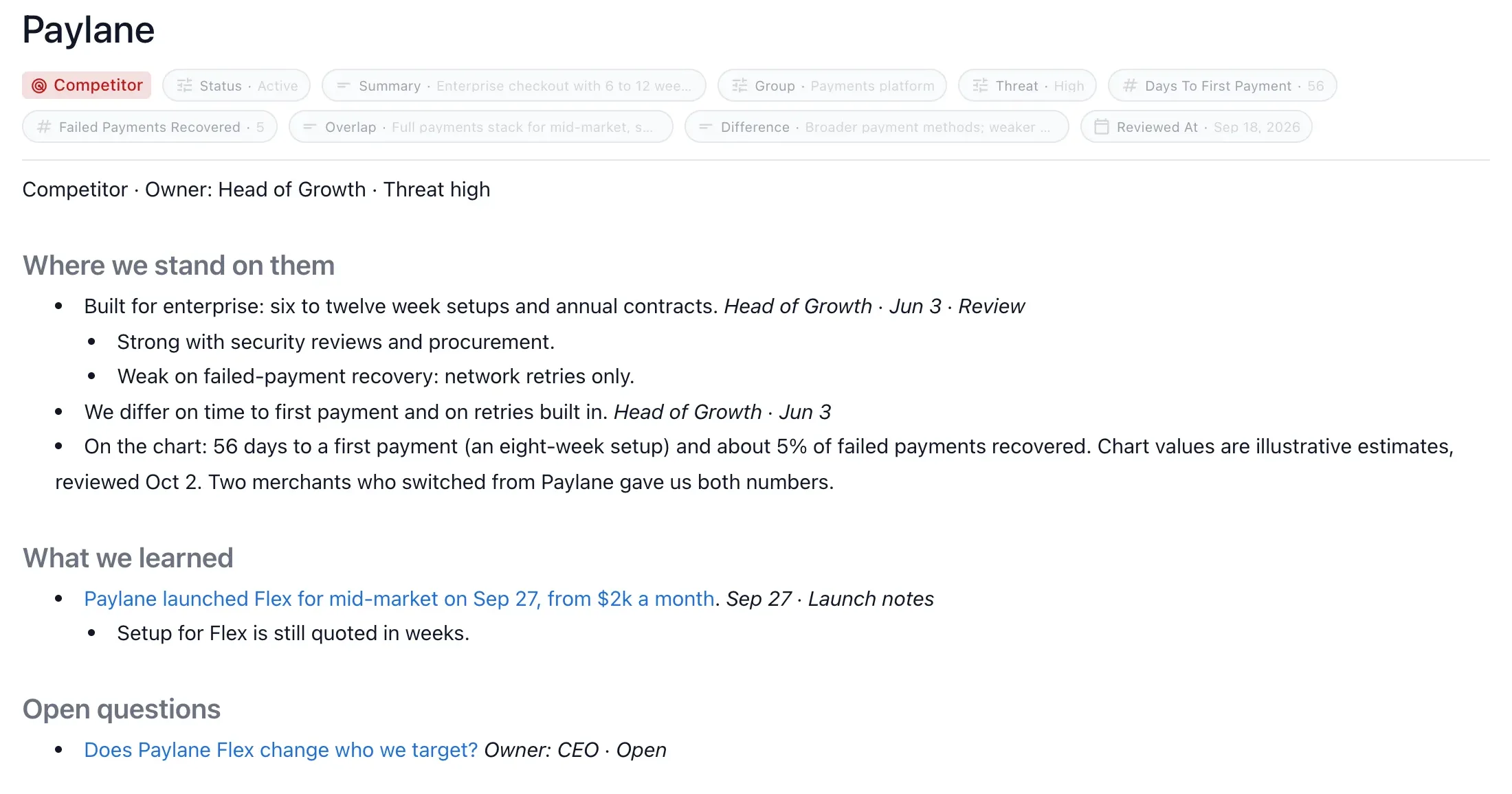
Create a type
Ask the agent and name the fields you care about:
Track our competitors in the wiki: category, threat, setup speed and payment recovery for each.
The agent defines the type, places its page in the tree, and creates a page for each competitor you name or it finds in your sources. Ask for more items later in the same way, or edit the fields of any item in the browser view.
Add a type only when you keep track of several things of one kind and want them in a table. For a single item, use an ordinary page.
Pages or a table
Each type stores its items one of two ways:
| Storage | Each item is | Use it when |
|---|---|---|
pages (the default) | A markdown page with fields, a body and child pages | Items need notes, sources, decisions or sub-pages |
table | A row in one CSV file, fields only | You only need the fields, such as a long list of partners |
A table that later needs notes can be converted to pages. Ask the agent to “convert Partners to pages”, or run:
nim wiki convert-type partner --to pagesEach row becomes a page in the same folder with its id and fields kept, and the CSV goes to the wiki’s trash.
Fields
Keep a type small: a title plus two to four single-valued fields. Only single-valued fields show in a page’s header.
| Field type | Holds |
|---|---|
string | Short text |
select | One value from a list of options |
number | A number |
boolean | Yes or no |
date | A date |
user | A person |
Some names are kept for each item’s own data, so a field with one of them saves to the file but never shows: id, type, activity, comments, source, content, origin, created and updated among them. Pick a more specific name, such as activityLevel or sourceUrl.
Type definition file
Each type is a small YAML file. The agent writes it, and you can edit it by hand. tableView.defaultColumns lists the fields shown as columns in the type’s table, in order.
# .nimbalyst/trackers/competitor.yaml
type: competitor
displayName: Competitor
displayNamePlural: Competitors
storage: pages
fields:
  - name: title
    type: string
  - name: threat
    type: select
    options:
      - value: high
        label: High
      - value: low
        label: Low
  - name: setupDays
    type: number
tableView:
  defaultColumns: [threat, setupDays]
A typed page is a markdown file whose frontmatter names the type and holds its fields:
---
id: 01M5G32PZ03JMJ1Z30PS399MXB
type: competitor
order: 3000
threat: high
setupDays: 14
---
Acme sells to mid-market finance teams through partners.
A table type keeps its items in one CSV named after the type’s plural name, such as Partners.csv. The first column is id, and the other columns are field names.
Each typed item also keeps an append-only change log beside it, such as Acme.activity.jsonl, recording each create, update, trash and restore.
Tables people can read on a phone
Keep a type’s table to about four columns of short values: a name, a status, a number, a person. A sentence-length value, such as what an item is waiting on, belongs in the item’s page.
Views on a team wiki
On a team wiki, the agent can place a view of a type in any page: a table, a board, a list, a timeline, a 2x2 of two number fields or a chart. A view stays current as the items change. Ask for it in plain words:
On the Strategy page, show competitors as a 2x2 of price against setup days.
A 2x2 view needs two number fields, and a chart groups items by a single-select, person, yes-or-no or date field.
On a local wiki the type’s own page has the table, and other pages use a list of links or a 2x2 block instead of a view.
From the command line
nim tracker works on typed pages in the local wiki for any type whose definition sets storage:
nim tracker list --type competitor
nim tracker create competitor "Acme" --field threat=high
nim tracker get <id>
nim tracker update <id> --field threat=low
See the CLI reference.